Pixel Tracking: Complete Guide for Marketers in 2026

In an era where data drives every marketing decision, understanding how your audience interacts with your content across multiple touchpoints has become essential. Pixel tracking has emerged as one of the most powerful yet misunderstood tools in the modern marketer's arsenal. This invisible technology captures user behavior, measures campaign performance, and provides the granular insights needed to optimize marketing spend and maximize ROI. For businesses managing multiple campaigns and traffic sources, pixel tracking offers a level of visibility that traditional analytics methods simply cannot match.
Understanding Pixel Tracking Technology
Pixel tracking relies on a small, typically 1x1 pixel image embedded in web pages, emails, or advertisements. When a user's browser loads this image, it sends a request to the server hosting the pixel, creating a trackable event. This simple mechanism enables marketers to collect valuable data about user behavior without requiring complex JavaScript implementations.
The technology operates silently in the background. A tracking pixel embedded in an email, for example, fires when the recipient opens the message, providing confirmation of engagement. Similarly, pixels placed on web pages can track conversions, monitor visitor flow, and build audience profiles that inform retargeting campaigns.

How Pixel Tracking Differs from Other Methods
Understanding the distinction between various tracking technologies helps marketers choose the right tools for their campaigns. While cookies store information on the user's device, pixel tracking works server-side, making it less vulnerable to browser restrictions and user deletions.
| Tracking Method | Storage Location | User Control | Lifespan | Primary Use Case |
|---|---|---|---|---|
| Pixel Tracking | Server-side | Limited | Per-session | Email opens, conversions |
| First-party Cookies | User's browser | Moderate | Up to 2 years | Session management, preferences |
| Third-party Cookies | User's browser | High | Varies | Cross-site tracking, retargeting |
| UTM Parameters | URL string | None | Single click | Campaign attribution |
Comparing pixel tracking with cookies reveals that each method serves distinct purposes in a comprehensive analytics strategy. Pixels excel at event tracking and real-time monitoring, while cookies provide persistent user identification across sessions.
The server-side nature of pixel tracking makes it particularly valuable in environments where JavaScript is restricted or disabled. Email clients, for instance, often block scripts but typically allow images to load, making pixels the preferred tracking method for email marketing campaigns.
Applications in Marketing Analytics
Marketing teams leverage pixel tracking across multiple channels to build comprehensive customer journey maps. Each pixel deployment serves a specific purpose, from measuring brand awareness at the top of the funnel to tracking post-purchase behavior for retention campaigns.
Email Campaign Monitoring
Email marketers depend on pixel tracking to measure engagement beyond simple delivery rates. Open rate tracking, powered by pixels embedded in email HTML, provides the first signal of recipient interest. This data segments audiences into engaged and disengaged groups, enabling targeted follow-up strategies.
Advanced implementations track not just opens but also the timing and frequency of email views. A subscriber who opens your newsletter multiple times demonstrates higher engagement than someone who glances once, and this behavioral data should inform your segmentation strategy accordingly.
Conversion Tracking and Attribution
The most valuable application of pixel tracking lies in conversion measurement. When you place a pixel on your thank-you page, checkout confirmation, or post-registration screen, you create a direct link between your marketing efforts and business outcomes.
This conversion data flows back to advertising platforms, enabling them to:
- Optimize campaigns toward users most likely to convert
- Calculate accurate cost-per-acquisition metrics
- Build lookalike audiences based on converter characteristics
- Provide attribution data across multiple touchpoints
For businesses running campaigns across multiple platforms, consistent pixel implementation ensures that every conversion gets properly attributed to its source, eliminating the guesswork from budget allocation decisions.

Retargeting and Audience Building
Pixel tracking enables sophisticated retargeting strategies by identifying users who have interacted with your brand but haven't converted. These pixels segment visitors based on specific behaviors, creating audiences for tailored messaging.
A visitor who viewed your pricing page but didn't sign up represents a different opportunity than someone who only read blog content. Pixel-based audience segments allow you to craft messages that address each group's specific position in the buying journey.
Privacy Considerations and Compliance
The power of pixel tracking comes with significant privacy responsibilities. As regulators worldwide scrutinize data collection practices, the Federal Trade Commission has highlighted concerns about the hidden nature of pixel tracking and its implications for consumer privacy.
Modern privacy regulations require transparency in data collection practices. Your privacy policy must disclose the use of tracking pixels, the types of data collected, and how that information gets used. Simply embedding pixels without user awareness can violate GDPR, CCPA, and other privacy frameworks.
Implementing Consent Management
Effective consent management balances compliance requirements with marketing objectives. Before loading tracking pixels, your website should obtain appropriate permissions through a clearly worded consent banner. This approach respects user autonomy while maintaining legal compliance.
Key consent management practices include:
- Loading pixels only after explicit user consent
- Providing granular control over different tracking categories
- Honoring opt-out requests immediately
- Maintaining records of consent for compliance audits
- Regularly reviewing and updating consent mechanisms
Some organizations implement a layered approach, loading essential analytics pixels by default while requiring opt-in for advertising and retargeting pixels. This strategy maintains basic visibility into site performance while respecting privacy preferences for more invasive tracking methods.
Data Security and Third-Party Risks
Recent research has examined pixel tracking implications in sensitive environments like healthcare, revealing that pixels can inadvertently expose confidential information. When pixels fire, they often transmit URL parameters, page titles, and other contextual data that might contain sensitive details.
Marketers must audit their pixel implementations to ensure they don't capture protected information. This includes reviewing what data gets passed in pixel requests and implementing filters to prevent transmission of personally identifiable information, health data, or financial details.
Strategic Implementation Best Practices
Deploying pixel tracking effectively requires more than simply copying code into your website footer. Strategic implementation considers user experience, technical performance, and data accuracy to ensure pixels enhance rather than hinder your marketing efforts.
Pixel Placement Strategy
Where you place pixels directly impacts the quality of data you collect. Conversion pixels belong on confirmation pages that users reach only after completing desired actions. Placing conversion pixels on pages that users might navigate to without converting creates false positives that corrupt your analytics.
Recommended pixel placement locations:
- Thank you pages following form submissions
- Order confirmation pages after checkout completion
- Account creation success screens
- Download confirmation pages for gated content
- Specific product or category pages for remarketing segments
For link management platforms, pixel tracking on shortened URL landing pages provides insight into which campaigns drive the most qualified traffic. This data informs optimization decisions and helps allocate marketing resources to the highest-performing channels.
Load Time and Performance Optimization
Each pixel adds another HTTP request to your page load sequence. While individual pixels are small, an accumulation of tracking scripts can significantly impact site speed, affecting both user experience and search engine rankings.
Implement asynchronous loading for all tracking pixels to prevent them from blocking page rendering. This ensures that even if a pixel server responds slowly, your content remains accessible to visitors. Additionally, consider using tag management systems to consolidate multiple pixels into a single container that loads more efficiently.
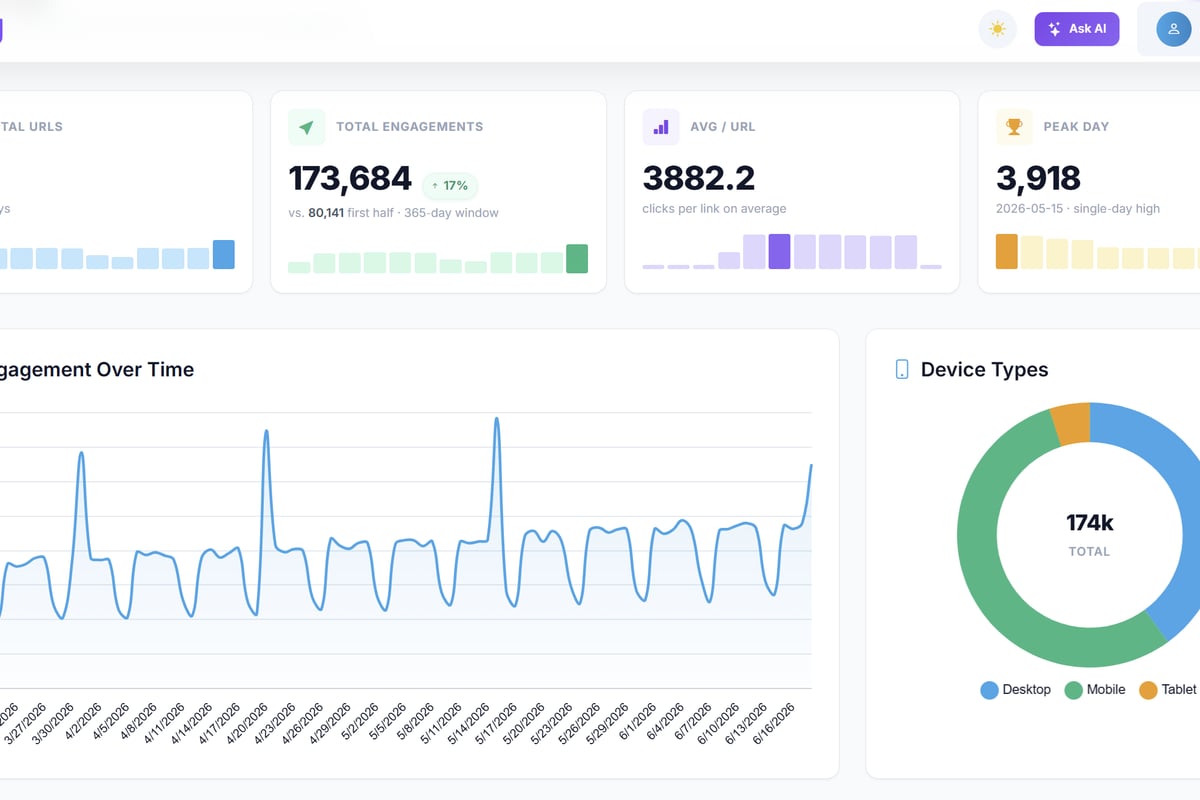
Trimy enables marketers to add retargeting pixels to shortened links without compromising load times, ensuring tracking capabilities don't sacrifice user experience. By managing pixel deployment through a centralized platform, you maintain consistent tracking across all campaign links while optimizing performance.
Testing and Validation
Never assume your pixels are firing correctly. Broken tracking creates blind spots in your analytics, leading to misinformed decisions and wasted budget. Establish a validation routine that checks pixel functionality after every website update or campaign launch.
Browser extensions designed for pixel debugging reveal which pixels fire on each page and what data they transmit. Use these tools to verify that:
- Pixels load on the correct pages
- They fire only once per page view (unless intentionally designed otherwise)
- They transmit the expected parameters
- No error messages appear in the network console
Regular validation catches implementation errors before they impact your data quality. Schedule quarterly audits of all active pixels to identify and remove obsolete tracking codes that no longer serve business purposes.
Integrating Pixel Tracking with Broader Analytics
Pixel tracking delivers maximum value when integrated with your complete analytics ecosystem. Isolated pixel data provides limited insight, but when combined with other tracking methods, it creates a comprehensive view of campaign performance and customer behavior.
Combining Pixels with UTM Parameters
Understanding the relationship between UTM parameters and pixel tracking enables more sophisticated attribution models. UTM parameters identify traffic sources at the click level, while pixels measure what happens after users arrive. Together, they connect campaign sources to conversion outcomes.
A typical workflow combines both methods:
- Append UTM parameters to all campaign links
- Capture UTM data when users land on your site
- Pass relevant campaign identifiers to conversion pixels
- Analyze which sources and campaigns generate conversions
This integrated approach eliminates attribution gaps and provides the granular data needed to optimize campaigns at the keyword, ad creative, and audience segment level.
Cross-Platform Tracking Strategies
Users rarely convert on their first interaction with your brand. They might see a social media ad on mobile, research on desktop later, and finally convert on tablet. Cross-device tracking, enabled by pixels that share user identifiers across platforms, helps reconstruct these fragmented journeys.
Modern advertising platforms use deterministic and probabilistic matching to connect user actions across devices. When users log into platforms like Facebook or Google on multiple devices, pixels can track their journey across those touchpoints, providing more accurate attribution than device-level tracking alone.

| Attribution Model | Pixel Tracking Role | Best For |
|---|---|---|
| Last-Click | Identifies final touchpoint before conversion | Direct response campaigns |
| First-Click | Tracks initial brand exposure | Awareness campaigns |
| Linear | Measures all touchpoints equally | Multi-channel strategies |
| Time-Decay | Weights recent interactions more heavily | Longer sales cycles |
| Data-Driven | Uses machine learning on pixel data | Sophisticated analytics teams |
Advanced Pixel Tracking Techniques
As marketing technology evolves, so do the capabilities of pixel tracking. Advanced implementations leverage server-side tracking, dynamic pixel parameters, and event-specific triggers to capture more nuanced behavioral data.
Dynamic Event Tracking
Rather than tracking only page views, dynamic pixels fire based on specific user actions. Scroll depth tracking identifies users who engage deeply with content. Click tracking on specific buttons reveals which calls-to-action resonate most. Video view tracking segments audiences by content consumption patterns.
These event-based pixels create behavioral segments far more valuable than simple visit-based audiences. Someone who watched 75% of your product demo video demonstrates significantly higher purchase intent than someone who bounced after ten seconds, and your retargeting messages should reflect this difference.
Server-Side Pixel Implementation
Browser-based tracking faces increasing challenges from ad blockers, privacy features, and cookie restrictions. Server-side pixel tracking addresses these limitations by processing tracking events on your web server before sending aggregated data to analytics platforms.
This approach offers several advantages:
- Greater accuracy: Bypasses browser-level blocking
- Enhanced privacy: Processes data server-side with full control
- Reduced client-side load: Minimizes performance impact
- Better data quality: Validates and filters data before transmission
Server-side implementations require more technical sophistication but provide more reliable tracking in the privacy-focused landscape of 2026.
Conditional Pixel Loading
Not every visitor needs every pixel. Conditional loading triggers specific pixels based on user characteristics, behavior, or consent status. This targeted approach reduces unnecessary tracking, improves site performance, and demonstrates respect for user privacy.
For instance, load retargeting pixels only for users who spend more than 30 seconds on your site, indicating genuine interest. Skip advertising pixels for users who arrived from organic search and focus tracking efforts on paid traffic sources requiring ROI measurement.
Measuring Success and Optimization
Implementing pixel tracking is just the beginning. Continuous measurement and optimization ensure your tracking infrastructure supports evolving business objectives and adapts to changing user behavior patterns.
Key Metrics to Monitor
Different pixels serve different purposes, and each requires specific metrics to evaluate performance. Conversion pixels demand attention to conversion rate, cost per conversion, and return on ad spend. Retargeting pixels need evaluation based on audience size growth, re-engagement rates, and incremental conversions.
Understanding what tracking pixels reveal about user behavior helps establish relevant KPIs for each implementation. An email open rate pixel contributes to engagement metrics, while a cart abandonment pixel directly impacts revenue recovery efforts.
Create a measurement framework that connects pixel data to business outcomes:
- Define success metrics for each pixel category
- Establish baseline performance benchmarks
- Set up automated alerts for tracking anomalies
- Review pixel performance monthly
- Retire underperforming or obsolete pixels
A/B Testing Pixel Configurations
Even pixel implementation benefits from experimentation. Test different pixel placements, trigger conditions, and data parameters to optimize tracking accuracy and business value. An A/B test might compare conversion rates when pixels fire on button click versus page load, revealing which approach captures more accurate conversion data.
Testing also helps balance tracking comprehensiveness with site performance. Measure how different pixel loading strategies affect page speed and user experience metrics, then choose configurations that optimize both tracking capability and site performance.
Future Trends in Pixel Tracking
The tracking landscape continues evolving as privacy regulations tighten and browser technologies advance. Staying ahead of these changes ensures your tracking infrastructure remains effective and compliant in the years ahead.
Privacy-First Tracking Solutions
The industry is shifting toward privacy-preserving measurement techniques that provide useful insights without compromising individual privacy. Aggregated reporting, on-device processing, and differential privacy represent the future of tracking technology.
These approaches maintain marketing effectiveness while respecting user privacy preferences. Rather than tracking individuals across the web, privacy-first methods focus on cohort-based insights and aggregated behavioral patterns that inform campaign optimization without exposing personal information.
Machine Learning Integration
Modern tracking platforms increasingly leverage machine learning to extract insights from pixel data automatically. Predictive models identify high-value users early in their journey, enabling proactive engagement strategies. Anomaly detection algorithms flag unusual patterns that might indicate tracking errors or fraudulent activity.
These AI-powered capabilities transform pixel tracking from a passive data collection mechanism into an active intelligence system that drives real-time marketing decisions and automatic campaign optimizations.
Pixel tracking remains an essential component of modern marketing analytics, providing the visibility needed to measure campaign performance, optimize spending, and deliver personalized experiences across channels. As privacy concerns reshape the digital landscape, implementing tracking solutions that balance business needs with user privacy becomes increasingly critical. Trimy helps marketers navigate this complexity by combining link management with advanced analytics and pixel integration, transforming every shortened URL into an intelligence-gathering opportunity that drives measurable business results.