Adobe Express QR Code Generator: Complete Guide 2026

QR codes have evolved from simple black-and-white squares into powerful marketing tools that bridge physical and digital experiences. The adobe express qr code generator offers marketers and designers a streamlined way to create visually appealing QR codes without advanced technical skills. This comprehensive guide explores how to leverage Adobe Express for QR code creation, optimize codes for tracking and conversions, and implement best practices that align with modern link management strategies.
Understanding the Adobe Express QR Code Generator
Adobe Express provides an integrated QR code generation tool that combines design flexibility with functional simplicity. The platform allows users to create QR codes directly within their design workflow, eliminating the need to switch between multiple applications.
The adobe express qr code generator supports various content types including URLs, plain text, email addresses, phone numbers, and SMS messages. This versatility makes it suitable for diverse marketing applications, from print advertisements to product packaging. Users can generate codes in seconds by simply entering their desired content and customizing the visual appearance.

Key Features and Capabilities
The generator includes several features that distinguish it from basic QR code tools:
- Visual customization with color selection and pattern modifications
- Logo integration to maintain brand identity within the QR code
- High-resolution export options for both digital and print applications
- Template library with pre-designed layouts incorporating QR codes
- Direct integration with Adobe Creative Cloud workflows
One significant consideration is that Adobe Express creates static QR codes by default. Static codes permanently encode the destination URL within the QR pattern itself, meaning you cannot change where the code directs users after printing or distribution.
Strategic Limitations of Static QR Codes
While the adobe express qr code generator excels at creating visually appealing codes, marketers must understand the constraints of static QR technology for campaign management and optimization.
The Analytics Gap
Static QR codes provide no native tracking capabilities. When you generate a code pointing directly to your website, you have no visibility into:
- Total number of scans
- Geographic location of users
- Device types and operating systems
- Time and date of scan activity
- Conversion rates from scan to action
This analytics blind spot creates significant challenges for ROI measurement and campaign optimization. Without scan data, you cannot determine which placement locations perform best, which creative designs drive engagement, or how QR code campaigns compare to other marketing channels.
Inflexibility After Distribution
Once you print static QR codes on business cards, packaging, signage, or promotional materials, the destination cannot be modified. If you need to update the landing page, fix a broken link, or redirect traffic to a seasonal campaign, you must reprint all materials containing the original code.
| Feature | Static QR Code | Dynamic QR Code |
|---|---|---|
| Analytics tracking | None | Comprehensive |
| Destination editing | Impossible | Anytime |
| A/B testing | Not supported | Full capability |
| UTM parameters | Manual only | Automated |
| Retargeting pixels | Not available | Integrated |
| Cost | Free | Platform-dependent |
This table illustrates why professional marketers typically combine visual design tools with advanced link management platforms.
Building a Hybrid QR Code Workflow
The most effective approach combines Adobe Express's design capabilities with a dedicated link management platform to gain both aesthetic appeal and analytical power.
Step-by-Step Implementation
1. Create a trackable short link in your link management platform before designing your QR code. This link should include UTM parameters, retargeting pixels, and any other tracking mechanisms your campaigns require.
2. Generate the QR code in Adobe Express using your trackable short link as the destination URL. This encodes your intelligent link within the QR pattern while maintaining full tracking and editing capabilities.
3. Customize the visual design to align with your brand guidelines, incorporating brand colors and logos as appropriate for your marketing materials.
4. Export at appropriate resolution based on your intended use case, with 300 DPI or higher for print applications and optimized file sizes for digital distribution.
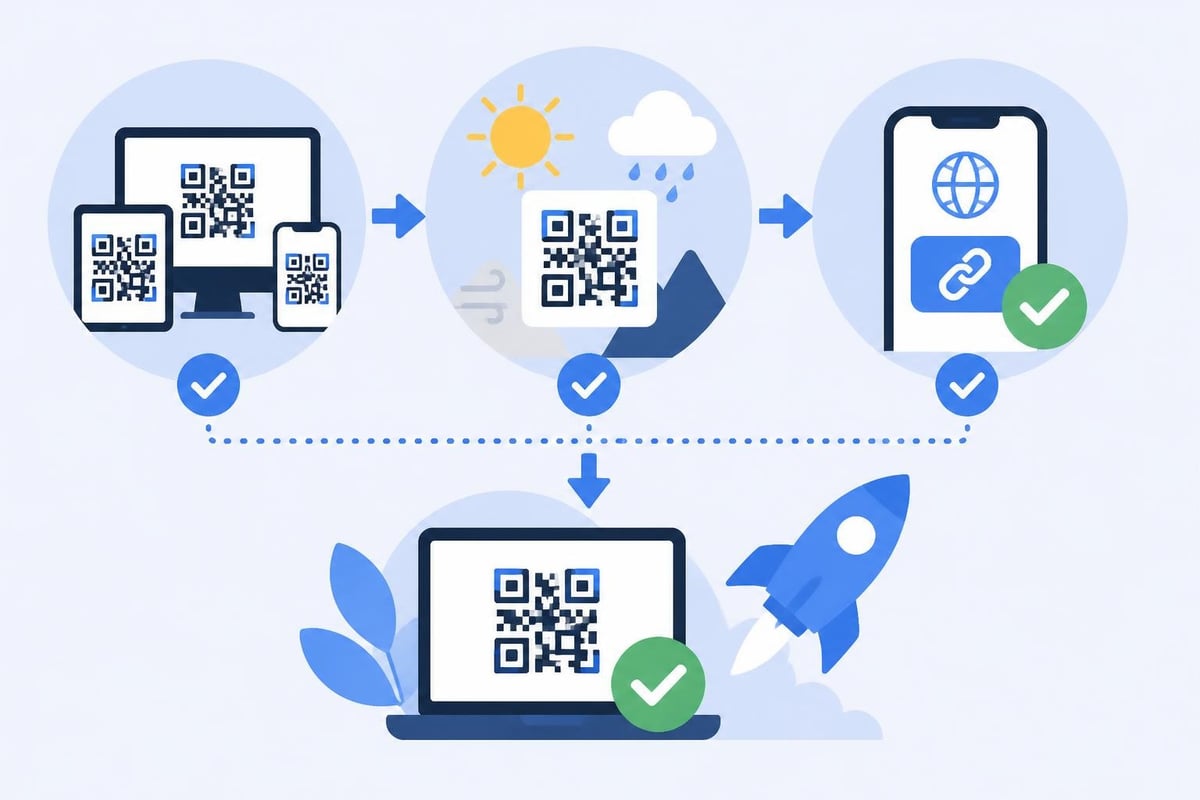
5. Test thoroughly across multiple device types and QR code readers to ensure consistent scanning performance before mass production.
This workflow preserves the flexibility to update destinations, track performance metrics, and optimize campaigns while benefiting from Adobe Express's design tools.

Design Best Practices for Scannable QR Codes
Visual customization in the adobe express qr code generator enables brand-aligned designs, but excessive modification can compromise scanning reliability. Following established guidelines ensures your codes remain functional across diverse scanning conditions.
Size and Placement Considerations
QR codes require minimum size thresholds based on scanning distance. The general formula is 10:1 ratio between scanning distance and code size. A code scanned from 10 inches should measure at least 1 inch square.
For retail and packaging applications, GS1 guidelines for 2D barcodes recommend minimum dimensions and quiet zone specifications that ensure reliable scanning at point-of-sale systems and consumer smartphones.
- Minimum size: 0.8 inches (2 cm) square for handheld scanning
- Quiet zone: At least 4 modules of white space around all edges
- Contrast ratio: Minimum 40% difference between foreground and background
- Surface quality: Avoid reflective or textured materials that interfere with scanning
Color and Contrast Guidelines
While Adobe Express allows extensive color customization, maintaining adequate contrast is essential for scanner recognition. Dark patterns on light backgrounds provide optimal readability.
Recommended approaches:
- Use brand colors for the background while keeping dark foreground patterns
- Limit color modifications to 20-30% of the total pattern area
- Test codes with multiple smartphone camera applications before production
- Avoid red and yellow combinations that reduce camera contrast detection
- Maintain at least 40% luminosity difference between colors
Codes with insufficient contrast may scan successfully in ideal lighting but fail in dim environments or with older smartphone cameras.
Security Considerations for QR Code Campaigns
QR codes present unique security challenges because users cannot visually verify the destination before scanning. Fraudulent codes have been used in phishing attacks, malware distribution, and financial scams.
Real-World Security Threats
Consumer Reports has documented numerous QR code scams targeting consumers through fake delivery notifications and parking payment systems. The Better Business Bureau warns that fraudsters increasingly use QR codes because they obscure malicious URLs from visual inspection.
Academic research, including a 2024 study on QR code phishing, demonstrates that users rarely scrutinize QR code destinations and often trust codes in physical locations without verification.
Protective Measures for Legitimate Campaigns
Professional marketers can implement several strategies to protect customers and maintain brand trust:
Transparent destination display: Use link management platforms that show preview pages before final redirection, allowing users to verify the destination matches your brand.
Branded short domains: Custom domains like brand.link immediately signal legitimacy and reduce user hesitation compared to generic shorteners.
HTTPS enforcement: Ensure all QR code destinations use secure protocols to protect user data and demonstrate security consciousness.
Clear context: Always provide text near QR codes explaining exactly where they lead ("Scan to view our product catalog" rather than just "Scan here").
Regular monitoring: Check that your codes haven't been physically replaced with fraudulent versions, particularly on public signage or outdoor installations.
Advanced Applications for Marketing Campaigns
The adobe express qr code generator serves as the visual creation tool for sophisticated marketing implementations that extend beyond simple URL encoding.
Multi-Channel Campaign Integration
QR codes excel at connecting physical touchpoints with digital measurement systems. Strategic implementations include:
- Direct mail campaigns with unique codes per recipient for individual tracking
- Product packaging linking to authentication portals, usage instructions, or warranty registration
- Event materials directing attendees to session schedules, speaker information, or feedback forms
- Out-of-home advertising transforming billboards and transit ads into measurable digital interactions
- Restaurant and retail providing contactless menu access, payment options, or loyalty program enrollment
Each application benefits from dynamic link management that enables destination updates without reprinting physical materials.
Geographic and Temporal Targeting
Combining QR codes with intelligent link routing unlocks location-based and time-sensitive campaign capabilities. A single printed QR code can direct users to different destinations based on:
| Routing Parameter | Marketing Application |
|---|---|
| Geographic location | Regional offers, store locators, language-specific content |
| Time of day | Business hours information, time-limited promotions |
| Device type | App download pages for mobile, full website for desktop |
| Previous visit status | New customer welcome vs. returning customer offers |
| Campaign performance | Automatic traffic shifting to highest-converting landing page |
These capabilities require link management platforms with smart routing functionality, but the QR code itself remains unchanged across all scenarios.
Measuring QR Code Campaign Performance
Effective measurement transforms QR codes from creative elements into accountable marketing channels with clear ROI attribution.
Essential Metrics and KPIs
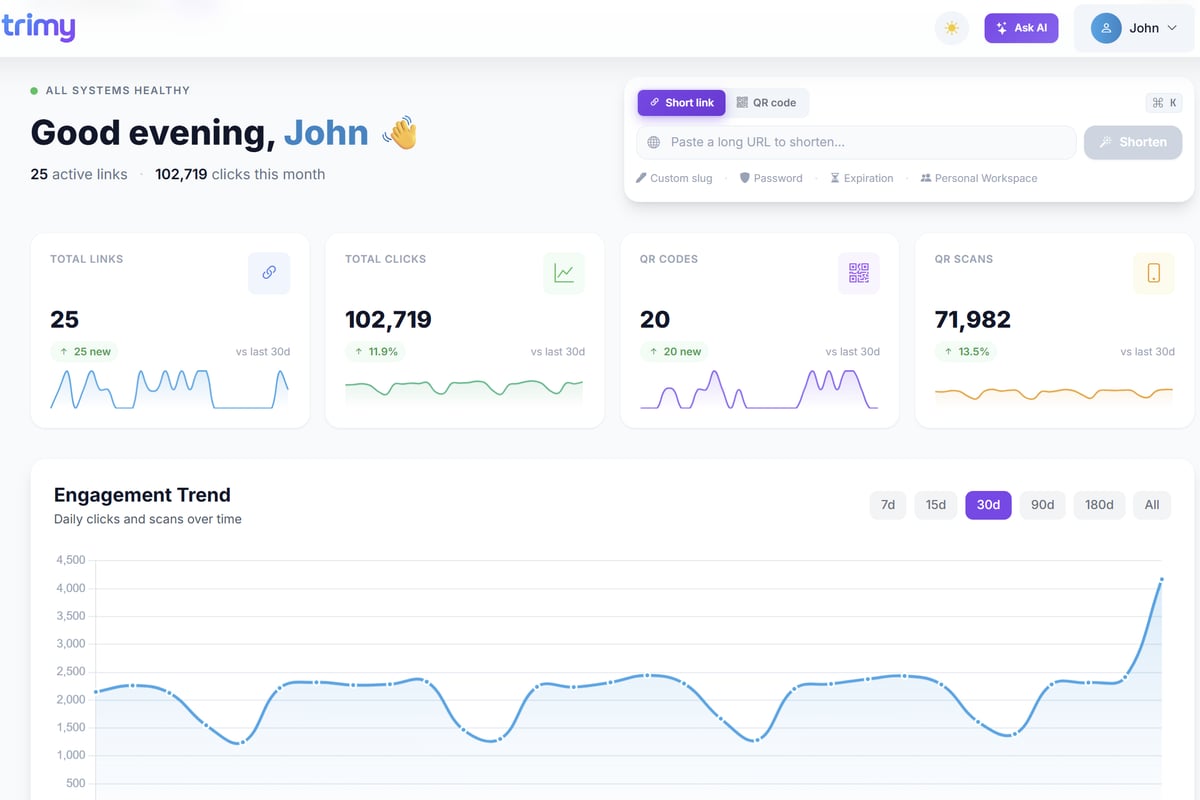
Scan volume provides the top-level engagement metric, indicating how many users interacted with your physical materials. Track total scans, unique users, and repeat scan patterns to understand reach and engagement depth.
Scan-to-conversion rate measures the percentage of QR code scans that result in desired actions such as purchases, form submissions, or account creations. This metric reveals landing page effectiveness and audience quality.
Geographic distribution shows which physical locations generate the most engagement, informing decisions about material placement, regional campaign expansion, or underperforming location improvements.
Temporal patterns identify peak scanning times and days, enabling optimized campaign timing and resource allocation for time-sensitive offers or event promotions.
When you're ready to move beyond basic QR code generation and gain full visibility into your link performance, Trimy offers comprehensive analytics, A/B testing, and smart routing capabilities that transform simple QR codes into intelligent marketing tools. The platform integrates seamlessly with codes created in Adobe Express, adding the tracking and optimization layer that static codes lack.
Attribution and Multi-Touch Analysis
QR codes typically represent mid-funnel or late-funnel touchpoints in customer journeys. Proper attribution requires tracking how QR interactions relate to other marketing channels and touchpoints.
UTM parameter strategies for QR codes should include:
utm_source=qr_codeto identify the channelutm_medium=printor specific medium type (packaging, billboard, direct_mail)utm_campaignmatching your overall campaign identifierutm_contentspecifying the physical location or creative variant
This structured approach enables comparison between QR performance and other channels within your analytics platform, supporting holistic campaign evaluation and budget optimization.
Technical Considerations for Enterprise Implementation
Large-scale QR code deployments require systematic approaches to code generation, distribution management, and quality assurance.
Version Control and Code Management
Organizations deploying hundreds or thousands of unique QR codes need centralized systems for:
- Code inventory tracking with metadata including creation date, intended location, and expiration
- Visual variation management ensuring brand consistency across different design teams
- Destination mapping maintaining clear records of which codes point to which content
- Replacement workflows for updating codes due to damage, theft, or strategic changes
Spreadsheet-based tracking becomes impractical beyond small campaigns. Enterprise link management platforms typically include code generation APIs and bulk management tools that integrate with design workflows.
Quality Assurance Protocols
Before production, implement systematic testing that validates:
Cross-device compatibility: Test with iPhone and Android devices representing current and previous generation models to ensure broad accessibility.
Reader application variety: Verify scanning with native camera applications, dedicated QR reader apps, and popular social media platforms that include QR scanning features.
Environmental conditions: Test under various lighting conditions, angles, and distances matching real-world usage scenarios.
Print quality verification: Review printed samples at actual size before full production runs, checking for ink saturation, paper texture interference, and edge definition.
Destination accuracy: Confirm all linked content loads correctly, displays properly on mobile devices, and includes required tracking parameters.
This validation process prevents costly reprints and ensures positive user experiences across diverse scanning conditions.
Platform Comparison and Selection Criteria
The adobe express qr code generator represents one option within a diverse ecosystem of QR code creation tools, each offering different capabilities and trade-offs.
Evaluation Framework
When selecting QR code generation tools for marketing campaigns, assess these critical dimensions:
Analytics depth: Does the platform provide scan tracking, user demographics, conversion attribution, and campaign comparison capabilities?
Dynamic editing: Can you change destinations after code distribution, or are codes permanently static?
Design flexibility: What customization options exist for colors, patterns, logos, and brand integration?
Integration capabilities: Does the tool connect with your existing marketing stack, CRM, analytics platforms, and design workflows?
Cost structure: What are the total costs including per-code fees, feature tiers, and volume pricing?
Enterprise features: For larger organizations, does the platform support team collaboration, role-based access, API integration, and bulk operations?
Adobe Express excels at visual creation but lacks the analytics and dynamic functionality that professional marketing campaigns require, making hybrid workflows the optimal approach for most commercial applications.
Future Developments and Emerging Standards
QR code technology continues evolving with new standards, capabilities, and use cases that marketers should monitor for strategic planning.
Dynamic QR Code Standards
Industry efforts are underway to establish standardized dynamic QR code formats that embed metadata about code ownership, creation date, and security verification. These standards aim to help scanning applications warn users about suspicious or unverified codes.
Augmented Reality Integration
Next-generation implementations combine QR code scanning with augmented reality experiences, allowing users to visualize products in their environment, access 3D model demonstrations, or participate in interactive branded experiences directly from physical marketing materials.
Enhanced Security Protocols
Emerging security frameworks will enable QR codes to include cryptographic signatures that verify authentic codes from legitimate brands, reducing phishing risks and increasing consumer confidence in QR-based interactions.
Payment and Transaction Evolution
QR codes are becoming standardized for payment processing, ticketing, and identity verification applications, expanding their utility beyond simple URL linking into secure transaction mechanisms that require robust authentication and encryption.
Professional marketers should stay informed about these developments while focusing current implementations on proven best practices and reliable measurement frameworks.
Creating effective QR code campaigns requires balancing visual design with analytical capability and security considerations. The adobe express qr code generator provides excellent tools for creating branded, visually appealing codes that maintain professional aesthetics across marketing materials. By combining Adobe Express's design strengths with a dedicated link management platform, you gain both creative control and the tracking, editing, and optimization capabilities that modern marketing demands. Trimy bridges this gap with comprehensive analytics, dynamic link management, and smart routing that transforms simple QR codes into intelligent marketing assets, giving you full visibility into campaign performance while maintaining the flexibility to optimize in real-time.