QR Code Generator for Google Forms: Complete Guide

Google Forms has become an indispensable tool for collecting data, gathering feedback, and managing registrations. However, sharing long URLs can create friction in the response process. A QR code generator for Google Forms solves this challenge by transforming your form links into scannable codes that users can access instantly with their smartphones. This approach eliminates typing errors, speeds up form access, and significantly improves response rates across various contexts-from in-person events to printed marketing materials.
Why Use QR Codes for Google Forms
Traditional URL sharing methods present several obstacles. Long form URLs are difficult to remember, prone to typing mistakes, and challenging to display on print materials without consuming excessive space.
QR codes address these pain points directly:
- Instant access: Users scan and open forms in seconds
- Error elimination: No manual URL entry required
- Print-friendly: Compact visual element suitable for any material
- Mobile-optimized: Perfectly suited for smartphone-first audiences
- Professional appearance: Clean, modern aesthetic for branded materials
Research indicates that QR code adoption has increased dramatically since 2020, with over 89 million smartphone users in the United States expected to scan QR codes by 2025. This widespread familiarity makes QR codes an accessible solution for audiences of all technical skill levels.

Built-in Methods for Creating Google Forms QR Codes
Google Forms includes native functionality for generating shortened URLs, though it doesn't provide direct QR code creation. Understanding this limitation helps you choose the right approach for your needs.
Using the Google Forms Shortened URL Feature
Every Google Form generates an automatic shortened URL that reduces character count. To access it:
- Open your Google Form in edit mode
- Click the "Send" button in the upper right corner
- Select the link icon
- Check the "Shorten URL" box
- Copy the condensed link
This shortened URL serves as a better foundation for QR code generation than the full-length version. While Google doesn't generate QR codes natively, you can paste this shortened link into any QR code generator tool.
Limitations of the Native Approach
The built-in shortened URL offers convenience but lacks several critical features:
- No tracking of scan metrics
- Limited customization options
- No ability to update the destination URL
- Absence of analytics integration
- No branded domain support
These limitations become significant when running marketing campaigns, conducting market research, or managing multiple forms simultaneously.
Third-Party QR Code Generators for Google Forms
Specialized tools extend functionality beyond Google's native capabilities. Several platforms focus specifically on creating QR codes for forms and surveys.
Dedicated Google Forms QR Generators
FlowyForm provides a free QR code generator designed specifically for Google Forms, offering watermark-free downloads without requiring user registration. This straightforward approach works well for simple use cases where basic QR code functionality meets your requirements.
QR-Lynx offers specialized tools for converting Google Forms into scannable codes with additional features for accessibility and professional applications. These dedicated solutions understand the specific needs of form creators and optimize their interfaces accordingly.
Comparison of Generator Features
| Feature | Basic Generators | Premium Generators | Link Management Platforms |
|---|---|---|---|
| QR Code Creation | Yes | Yes | Yes |
| Custom Design | Limited | Yes | Yes |
| Analytics Tracking | No | Basic | Advanced |
| Dynamic QR Codes | No | Sometimes | Yes |
| A/B Testing | No | No | Yes |
| Branded Domains | No | Sometimes | Yes |
The right choice depends on your specific requirements. Basic needs might require only simple generation, while marketing campaigns benefit from comprehensive analytics and management features.
Creating QR Codes with Link Management Platforms
Link management platforms offer the most sophisticated approach to generating and managing QR codes for Google Forms. These systems treat QR codes as part of a broader link intelligence strategy.
Advantages of integrated platforms:
- Unified dashboard for all marketing links and QR codes
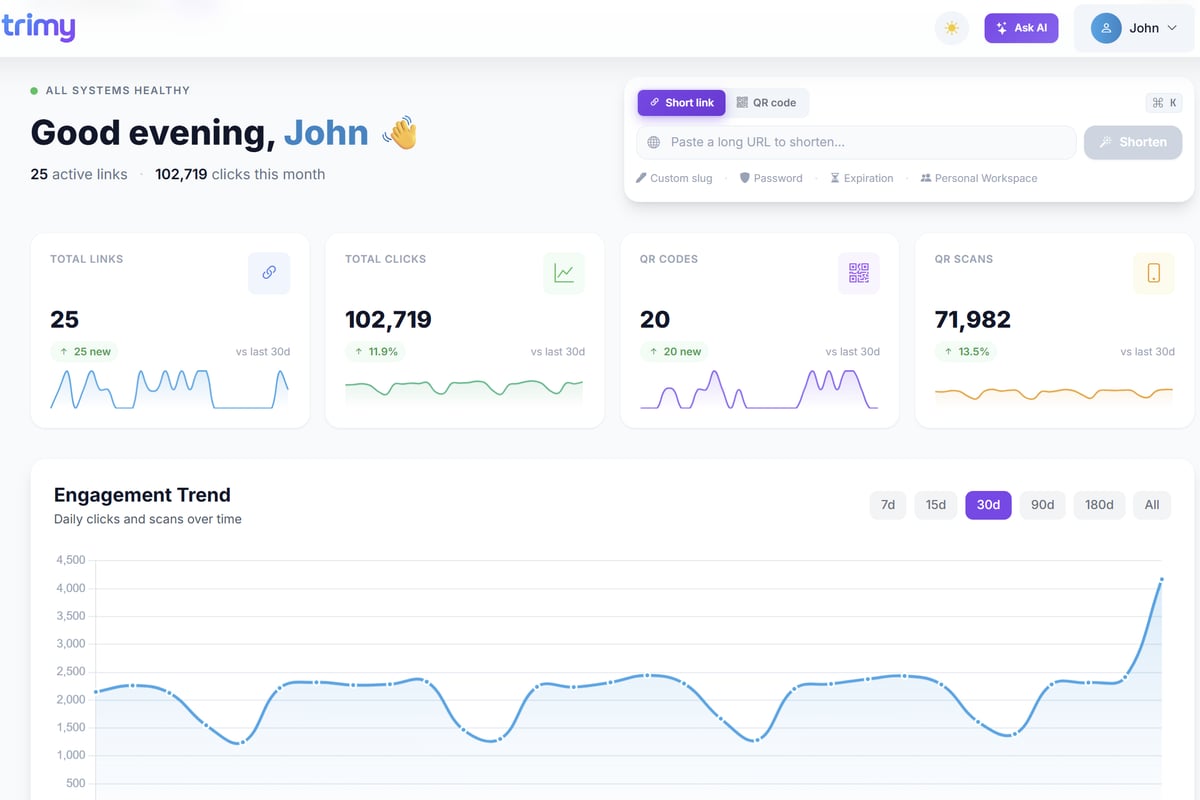
- Real-time analytics showing scan patterns and conversion data
- Dynamic QR codes that allow URL updates without reprinting
- A/B testing capabilities for optimizing form performance
- UTM parameter management for attribution tracking
- Retargeting pixel integration for advanced marketing workflows
Trimy combines QR code generation with comprehensive link analytics, allowing marketers to transform Google Forms into measurable revenue signals. The platform enables you to create QR codes that connect to your forms while providing deep insights into user behavior, geographic distribution, device types, and conversion patterns.
Setting Up Dynamic QR Codes
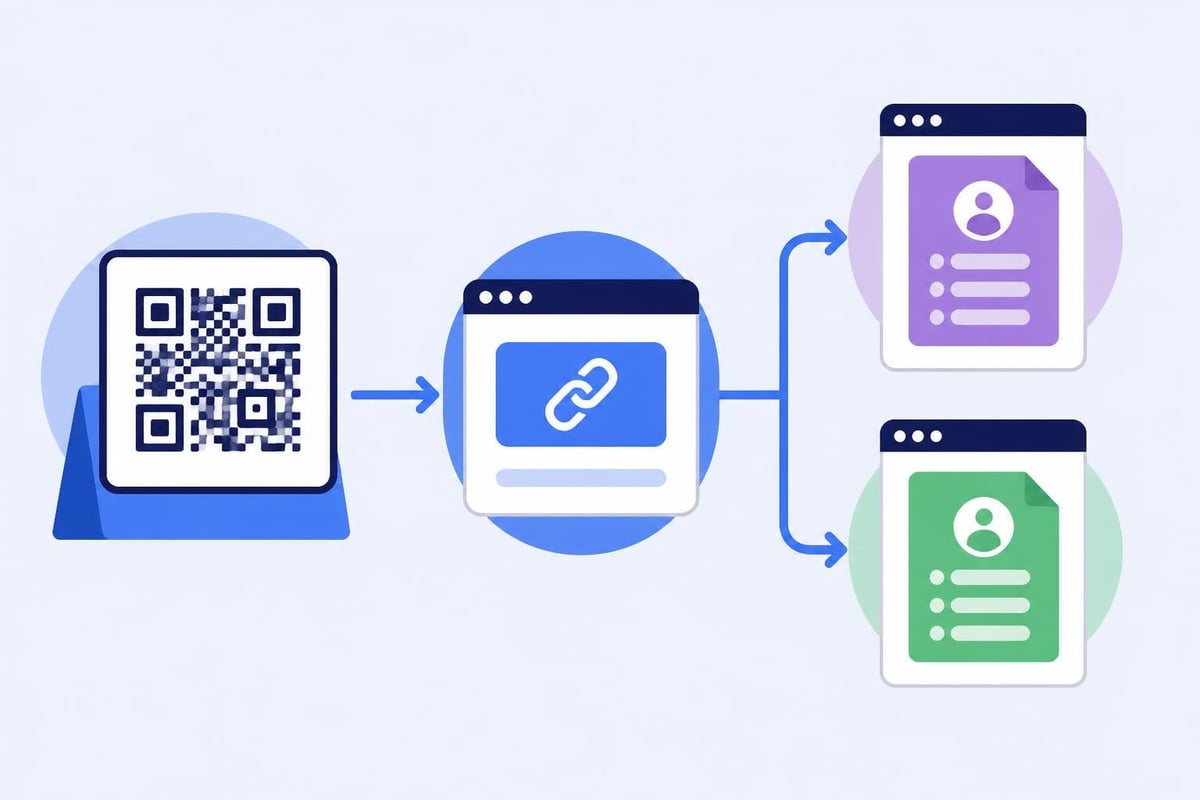
Dynamic QR codes separate the physical code from the destination URL. This architecture provides unprecedented flexibility for campaigns that span multiple channels or time periods.
The process involves:
- Creating a shortened link through your link management platform
- Generating a QR code that points to the shortened URL
- Configuring the shortened URL to redirect to your Google Form
- Monitoring scan analytics through the platform dashboard
- Updating the destination URL whenever needed without changing the QR code
This approach proves particularly valuable for printed materials, product packaging, or permanent installations where reprinting would be costly or impossible.
Best Practices for Google Forms QR Code Design
Visual design directly impacts scan success rates. Strategic customization improves both functionality and brand recognition.
Size and Placement Considerations
QR codes require sufficient size for reliable smartphone camera detection. Minimum recommended dimensions vary by context:
- Business cards: 0.8 x 0.8 inches minimum
- Posters and flyers: 2 x 2 inches for visibility from distance
- Product packaging: 1 x 1 inch depending on package size
- Digital displays: Scale based on viewing distance and screen resolution
Always maintain adequate white space (quiet zone) around the QR code. This border prevents visual interference from surrounding elements and ensures consistent scanning performance.
Color and Branding Customization
While traditional black-and-white QR codes offer maximum reliability, modern scanners handle customized designs effectively when you follow basic principles:
- Maintain high contrast between foreground and background colors
- Ensure the foreground is darker than the background
- Test thoroughly across multiple devices before distribution
- Consider adding your logo to the center (up to 30% of the code area)
- Avoid gradient backgrounds that reduce scan reliability
Research on stylized QR codes demonstrates that aesthetic customization can coexist with scanning robustness when designers apply proper techniques and maintain adequate error correction levels.
Tracking and Analytics for QR Code Performance
Data collection transforms QR codes from simple convenience tools into strategic marketing assets. Comprehensive analytics reveal how audiences interact with your forms across different contexts.
Essential Metrics to Monitor
| Metric Category | Specific Data Points | Strategic Value |
|---|---|---|
| Engagement | Total scans, unique scans, scan rate | Measures reach and interest levels |
| Demographics | Geographic location, device types, operating systems | Informs targeting decisions |
| Behavior | Time of scan, scan-to-submission rate, drop-off points | Identifies optimization opportunities |
| Attribution | Campaign source, UTM parameters, referral paths | Connects forms to revenue outcomes |
Link management platforms aggregate this data into actionable dashboards. You can identify which physical locations generate the most engagement, which device types your audience prefers, and how scan patterns change over time.
Conversion Optimization Through Data
Analytics enable systematic improvement. Compare different approaches:
- Test QR code placement locations at events or retail environments
- Evaluate different call-to-action phrases above your QR codes
- Compare form submission rates across various QR code designs
- Analyze time-of-day patterns to optimize campaign timing
- Measure the impact of incentives on completion rates
A/B testing capabilities let you run controlled experiments. Create multiple QR codes pointing to different form versions and measure which achieves higher completion rates or better quality responses.
Security Considerations for QR Code Forms
QR codes introduce specific security challenges that require attention, particularly when collecting sensitive information through Google Forms.
Protecting Against QR Code Phishing
Research on QR code security highlights how malicious actors exploit QR codes for phishing attacks. Users cannot visually verify a QR code's destination before scanning, creating vulnerability.
Implementation safeguards:
- Use branded shortened URLs that users can recognize
- Display the destination URL near the QR code when possible
- Implement preview pages that show the form destination before redirect
- Educate your audience about legitimate QR code sources
- Monitor scan analytics for unusual patterns indicating compromise
These practices build trust while protecting respondents from potential threats.
Data Privacy and Compliance
When collecting information through QR code-enabled forms, consider privacy regulations:
- Clearly communicate what data you collect and how you use it
- Include privacy policy links on your forms
- Ensure compliance with GDPR, CCPA, or other relevant regulations
- Secure data transmission through HTTPS connections
- Limit data retention to necessary timeframes
Link management platforms should offer enterprise-grade security features including SSL encryption, access controls, and audit logs that support compliance requirements.

Advanced Use Cases for Google Forms QR Codes
Strategic implementation extends beyond basic form sharing. Sophisticated approaches leverage QR codes as components of integrated marketing systems.
Event Registration and Check-In Systems
QR codes streamline event management workflows:
- Generate unique QR codes for registration confirmation emails
- Create check-in forms linked to attendee databases
- Deploy scanning stations at entry points
- Collect real-time attendance data through form submissions
- Enable session-specific QR codes for detailed engagement tracking
This approach eliminates paper tickets while providing comprehensive event analytics.
Product Feedback and Warranty Registration
Manufacturers embed QR codes on product packaging or documentation:
- Link directly to product-specific feedback forms
- Pre-populate form fields with product model information
- Collect structured feedback for quality improvement
- Enable warranty registration without complex web navigation
- Build customer databases for future marketing initiatives
Smart routing capabilities direct different product SKUs to appropriately customized forms.
Educational Assessment and Surveys
Educational institutions deploy QR codes for:
- Course evaluation forms placed in classrooms
- Library resource feedback at specific locations
- Campus wayfinding with location-specific forms
- Event RSVP systems for student organizations
- Anonymous reporting mechanisms for safety concerns
The immediacy of QR codes increases participation rates compared to emailed survey links.
Mobile-Specific Optimization Strategies
Since QR codes target mobile users exclusively, form design must prioritize mobile experience.
Form Design for Mobile Respondents
Creating mobile-optimized forms on iPhone requires specific considerations:
- Minimize the number of required fields
- Use multiple-choice questions instead of text input when possible
- Implement progress indicators for longer forms
- Enable autofill for common fields like email and phone numbers
- Test forms across iOS and Android devices before deployment
Google Forms provides responsive design automatically, but question structure significantly impacts mobile completion rates.
Testing Across Devices and Contexts
Comprehensive testing prevents deployment failures:
- Scan QR codes from various distances and angles
- Test under different lighting conditions
- Verify performance on both high-end and budget smartphones
- Check loading speed on 4G and 5G connections
- Confirm form rendering on different screen sizes
Document which configurations work reliably and adjust design parameters accordingly.
Integration with Marketing Automation Workflows
QR codes become powerful when connected to broader marketing systems. Integration amplifies their strategic value.
Connecting Forms to CRM Systems
Modern workflows push Google Forms data directly into customer relationship management platforms:
- Capture lead information at trade shows or retail locations
- Trigger automated email sequences based on form responses
- Score leads according to response patterns
- Update contact records with preference data
- Enable sales team follow-up through integrated task creation
Link management platforms with webhook support facilitate these integrations without custom development.
Retargeting Based on QR Code Scans
Advanced implementations use scan data for advertising optimization:
- Add retargeting pixels to QR code landing pages
- Build custom audiences of users who scanned but didn't submit
- Create lookalike audiences based on high-quality form respondents
- Adjust advertising spend based on offline engagement metrics
- Measure the complete journey from physical interaction to conversion
This approach closes the loop between offline touchpoints and digital marketing campaigns.
Creating effective QR codes for Google Forms requires balancing technical implementation with strategic marketing objectives. By selecting appropriate generation tools, implementing tracking systems, and optimizing for mobile users, you transform simple forms into measurable marketing assets. Whether you need basic QR codes for occasional surveys or sophisticated dynamic codes integrated with comprehensive analytics, the right approach depends on your specific campaign requirements and measurement needs. Trimy provides the link intelligence infrastructure to maximize QR code performance, offering advanced analytics, A/B testing, and smart routing that transform every scan into actionable business insights.